Thursday, 19 February 2015

Samsung Launches 4G Capable Entry Level Smartphones

Samsung launches affordable 4G smartphone at Rs 9900

Facing growing competition from brands like Micromax and Xiaomi, Samsung on Monday launched the Galaxy J1 4G - to be priced at Rs 9,900 in India - as the Korean electronics giant looks to protect its turf in one of the world's fastest growing smartphone markets.

Facing growing competition from brands like Micromax and Xiaomi, Samsung on Monday launched the Galaxy J1 4G - to be priced at Rs 9,900 in India - as the Korean electronics giant looks to protect its turf in one of the world's fastest growing smartphone markets.

It launched two other 4G enabled smartphones - Galaxy Grand Prime 4G and the Galaxy Core Prime 4G. Samsungalso unveiled its slimmest Galaxy handset -- the Galaxy A7, priced at Rs 30,499. Galaxy A7 is available in India from Monday, while the other threesmartphones will hit the domestic market from the second week of March.

Friday, 13 February 2015

Laptop With 8k Display

VESA Unveils DisplayPort 1.4a, Brings 8K to Laptops

Filament.io
UHD
Feeling big with that new 4K ASUS latop, or 5K iMac? Well now feel what it’s like to be brought back down to earth. The guilty party for doing so is the Video Electronics Standards Association (or VESA for short) has unveiled Embedded DisplayPort 1.4a, which allows for all-in-ones and laptops to connect to 8K displays. To make this easier, the technology uses compression to get all the data into the video feed, and divides displays into two or four segments, allowing the pipeline to cope with the extra pixels.
But wait, there’s more! In doing this, PCs will need less data paths to drive lower resolutions, which will result in the usage of tinner and more efficient displays. This means laptops that “only” support 4K could gain increased battery life. With these new systems using DisplayPort 1.4a shipping next year, this is more than a theoretical exercise. However, all this will be dependent on how fast 8K displays become readily available and affordable.

3rd Generation Xeon E7 18 Cores

Partial Xeon E7 v3 Specifications Reveal up to 18 Cores

xeon
The next and third generation Xeon E7 processors for servers are likely to launch next quarter and more information about these processors have now been discovered in an IBM Installation and Service Guide.
The new Xeon processors will be built on Haswell-EX cores and will incorporate improvements such as increased number of cores, larger L3 cache, new AVX and TSX instructions, along with support for DDR4 memory.
Xeon E7 specs
There will only be 12 SKUs in the new v3 series, including four E7-4800 v3 models and eight E7-8800 v3 models.
Xeon E7-4800 v3 line will be comprised of E7-4809 v3, E7-4820 v3, E7-4830 v3 and E7-4850 v3 that will have 8, 10, 12 and 14 cores respectively. The CPUs come with 20 MB L3 cache for the 8-core processor and up to 35 MB for the 14-core one. They will operate between 1.9GHz and 2.2GHz and fit into 115 Watt power envelopes.
Xeon E7-8800 v3 series will also have 16- and 18-core models, exceptions are the Xeon E7-8893 v3 with 4 CPU cores, 3.2 GHz clock rate, and 140 Watt TDP and the E7-8891 v3 with 10 cores and a clock speed of 2.8 GHz.
The 16-core Xeon E7 v3 models are E7-8860 v3 and E7-8867 v3. The 140W and 165W TDP processors are clocked at 2.2 GHz and 2.5 GHz respectively.
Xeon E7-8870 v3, E7-8880 v3, E7-8880L v3 and E7-8890 v3 will have incredible 18 CPU cores and 45 MB of level 3 cache. Frequencies start at 2 GHz for E7-8880L v3 and go all the way up to 2.5 GHz for the E7-8890 v3. The low-power E7-8880L v3 has 115 Watt TDP which means just over 6W per core.

Testing Nvidia’s GeForce GTX 980 4GB In SLI

Testing Nvidia’s GeForce GTX 980 4GB Graphics Cards In SLI


Introduction


Nvidia_GTX980_SLI (2)
At eTeknix we were fortunate enough to have received a pair of GTX 980s for Nvidia’s launch day so we thought we’d see what they have to offer in SLI. When running a pair of the same GPUs in SLI it is ideal to get identical graphics cards for the most consistency of cooling, clock speeds, VRAM sizes and so on. In our case that wasn’t possible as we have one GTX 980 from Nvidia which is the reference model (check our review of that here) and we have one GTX 980 from Gigabyte which is their flagship G1 Gaming model (check our review of that here).
For our SLI testing both the GTX 980s were driving an ASUS ROG SWIFT PG278Q display In our review of both GTX 980s we know a single GTX 980 graphics card is more than enough for a smooth 60 frames per second (FPS) at 1440p in the vast majority of titles. However, if you want to effectively use the 144Hz refresh rate of the ASUS ROG SWIFT, you’re going to need to churn out as close to 144 FPS as possible. In this scenario SLI GTX 980s actually make sense because on their own one GTX 980 is not enough to drive such a high frame rate. Of course, it goes without saying you have to have deep pockets to afford a 144Hz 1440p monitor and a pair of GTX 980s – but even if you don’t have that kind of money seeing the numbers is still interesting.
asus_rog_swift
We put both GTX 980 graphics cards onto our Core i7 4960X and X79-based test system ensuring adequate spacing and that both have access to sufficient PCIe bandwidth for SLI operation.
Nvidia_GTX980_SLI (1)
In order to keep both GPUs running effectively we made sure the better cooled Gigabyte GTX 980 sits in the traditional “hot position” of an SLI configuration, the Nvidia GTX 980 reference card is at the end to give it more room to breathe.
Nvidia_GTX980_SLI (4)
Gigabyte’s model comes heavily overclocked so we had to underclock it for the purposes of this testing to make it resemble as close to a reference GTX 980 as possible. By removing 101MHz off the core we were able to match the GPU clock speeds on both cards, although the Gigabyte card (the GPU-Z on the right) has a slightly faster boost speed.
gtx_980sli
We also didn’t want to run into any cooling issues. We know from our reviews that Gigabyte’s card doesn’t thermal throttle but Nvidia’s reference design does. As a result we set a custom fan profile within MSI Afterburner to make sure both GPUs stay under 80 degrees to avoid clock speed variations. We did this because it’s easier to make sure both GPUs do not thermal throttle than it is to make sure Gigabyte’s GTX 980 thermal throttles in the same way as the reference graphics card. The main thing to note is that we didn’t want significant clock speed mis-matches so this was the smartest option.
gtx_980sli_customfan
Running the SLI configuration in Unigine Heaven for a while gave us an idea of what stable clocks both graphics cards were using. The core and memory clocks were pretty much identical which is great news for getting some accurate test results. We will of course overclock both cards towards the end and see how that helps overall performance.
gtx_980gpudetails

AMD R9 390X Specifications

Alleged AMD “Bermuda” R9 390X Specifications Detailed 


AMD_radeon_series
With AMD’s RX-2XX series now seemingly complete after the recent launches of the R9 295X2 and the R5 230, speculation is already hotting up for what might come next. Since AMD’s RX-X00 branding is relatively young we can safely assume the next series will go by the same naming conventions but transition from 2 to 3. At the top end WCCFTech reports that we should expect the R9 390X, R9 380X and R9 370X as the successors to the R9 290X, R9 280X and R9 270X. These next-generation cards should take advantage of TSMC’s 20nm process which is a shrink down from the current 28nm generation of AMD GCN based GPUs. AMD_R9_300_Series
These new 20nm parts will be codenamed “Pirate Islands” and succeed the current “Volcanic Islands” based RX 200 series. There will be three main GPU cores available which will probably be sub-divided to form multiple graphics card SKUs. Bermuda is the replacement for Hawaii (R9 295X2, R9 290X, R9 290), Fiji is the replacement for Tahiti (R9 280X and R9 280) and Treasure Island is the replacement for Curacao (R9 270X and R9 270). This new generation of AMD graphics cards is expected around late November 2014, that’s still 7 months away. Given that AMD and Nvidia are both relying on the same 20nm TSMC process we should also expect Maxwell to be delivered in a similar Q4 2014 time frame. The above specifications are all subject to change, as you might expect this early on in the development cycle. However, it’s great to see AMD will be continuing to increase stream processor count while shrinking the process node size and maintaining high clock speeds. If these early specifications are anything to go by AMD’s RX 300 series will be impressive to say the least.

Did Microsoft Planned DX12 For Xbox One ?

directx-12-over-70-percent-performance-boost-xbox-one
There are two groups of gamer’s who’re eager to get their hands on any DirectX 12 information, the first being PC gamer’s and the second Xbox One owners. Microsoft’s newest API isn’t being released until next year, but it’s showing a lot of promise – and according to the latest demos shown off (by a rather modest PC setup too) both Xbox and PC owners will be in for a real treat.
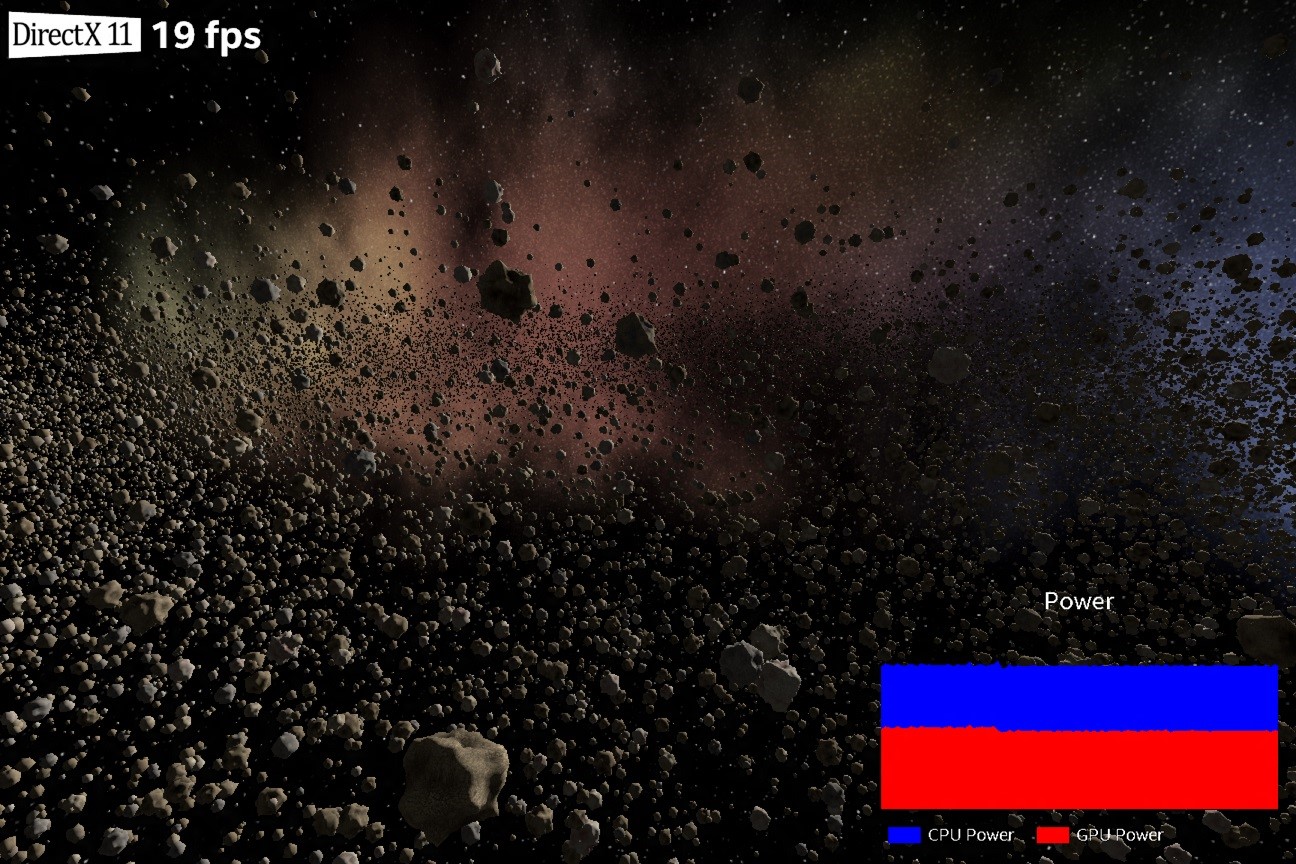
The demo was created by Intel, where around 50,000 different objects were drawn (asteroids) in space. Each object was unique, with its own trajectory and characteristics. If you’re wondering why these two points require emphasis it’s to ensure you understand that each one requires lots of its own draw calls. Requires lots of calculations from both the CPU and GPU, and it’s a clear example where Microsoft (and others such as AMD who’re pushing their own Mantle API) believe we’ll be seeing a nice performance gain.
Intel’s hardware wasn’t actually what you might be expecting it to be – you may be thinking it’ll be some super high end I7 Haswell CPU with a billion CPU cores and 16GB ram with a high end AMD or Nvidia GPU to show the over 70 percent performance increase with DX12… but you’d be wrong.
DirectX 11 running Intel's asteroid benchmark. Notice it manages an unplayable 19FPS
DirectX 11 running Intel’s asteroid benchmark. Notice it manages an unplayable 19FPS
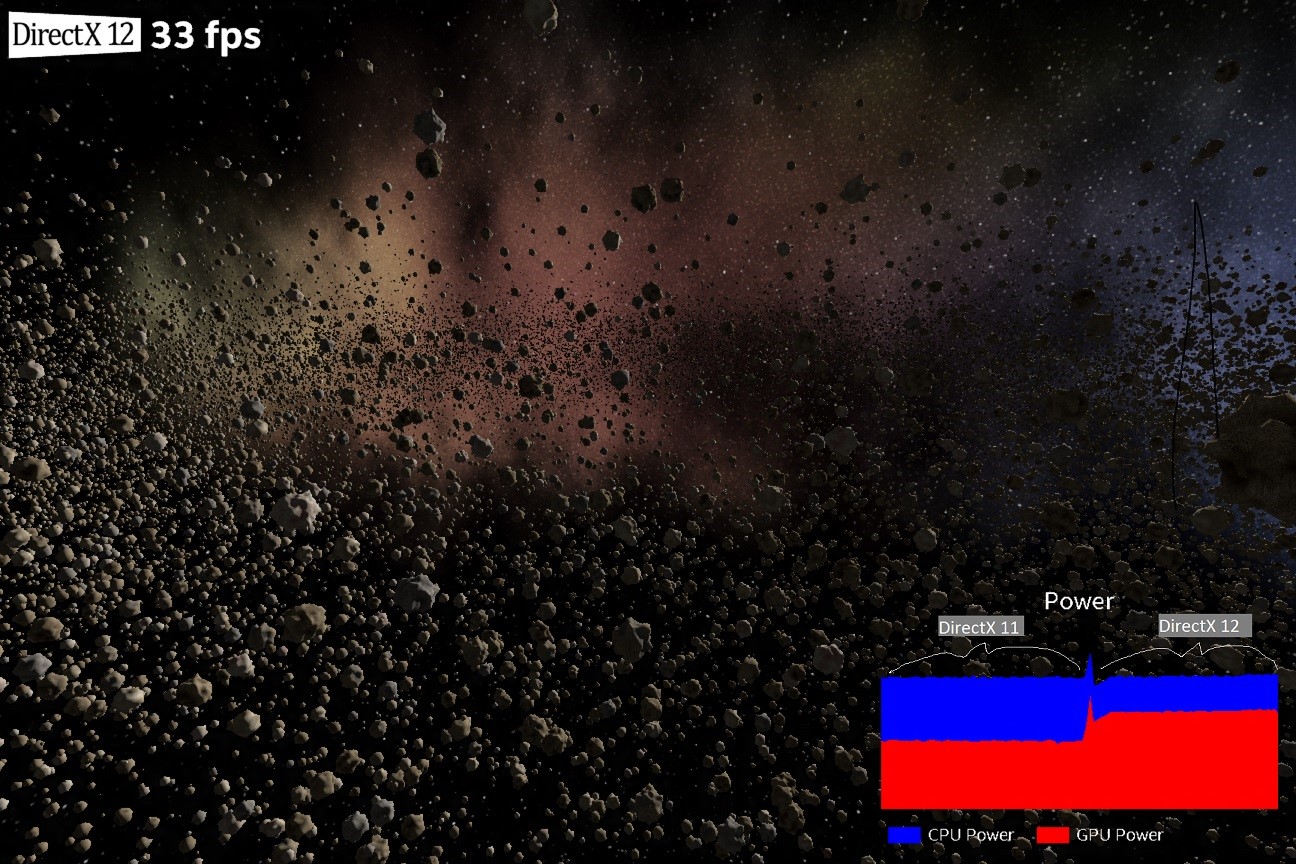
Instead, Intel used the Surface Pro 3, which is powered by an I5 and an Intel HD4400 for graphics. Neither of these two components are particularly super high end, and to be bluntly honest a modest gaming PC or the Xbox One stomps over the HD4400 in terms of raw horse power. Regardless, the demos purpose was to show just what might be possible with DirectX 12. It featured a frame rate counter, and the ability to switch between the two rendering API’s (the traditional DirectX 11 and the still being coded you’re reading this DirectX12). Finally, there was a graph which showed not just the CPU power usage, but the GPU’s power usage too.
While we’ve been through the issues of DX11 (and other high level API’s) before in great detail, in a nutshell their issue is simple. They’ve not been designed from the ground up for modern multi-core CPU’s. Yes, technically a game engine could run over let’s say half a dozen cores (and some such as BF4 do just that), but you’ll find one CPU cores typically has a significantly higher amount of usage than others. That’s because DirectX 11’s renderer is being run on solely that one core – meaning it’s bottlenecking performance. If the core stalls for any reason, either because it’s busy, waiting for a result of a calculation (from GPGPU), because your Anti-Virus decides now is the perfect time to run that scan you’ve been putting off for the last three weeks, or simply because another program runs in the background, frame rates will drop.
intel-DirectX-demonstration-Unlocked-FPS-DX12
Ah, that’s better. DirectX12 with an unlocked frame rate manages 33FPS – almost double DX11.
A side benefit (and one I’ve a feeling most people will start rolling their eyes at, if they’re either Xbox One gamer’s or PC gamer’s) is a massive reduction in power for the CPU. It does this by being a much more efficient API, and this in turn means greater battery life for mobile devices. Okay I admit it – I care little for the plight of mobile devices for the most part. But it’s also good news for PC’s too – why? potentially less CPU heat and power draw means possibly better / more stable overclocks. In fact, at almost 50 percent reduction in power this is the same as a large die shrink (22nm to 14nm) which is very impressive – particularly when die shrinks for both AMD and Intel are around the corner.

What about Xbox One and DirectX 12?

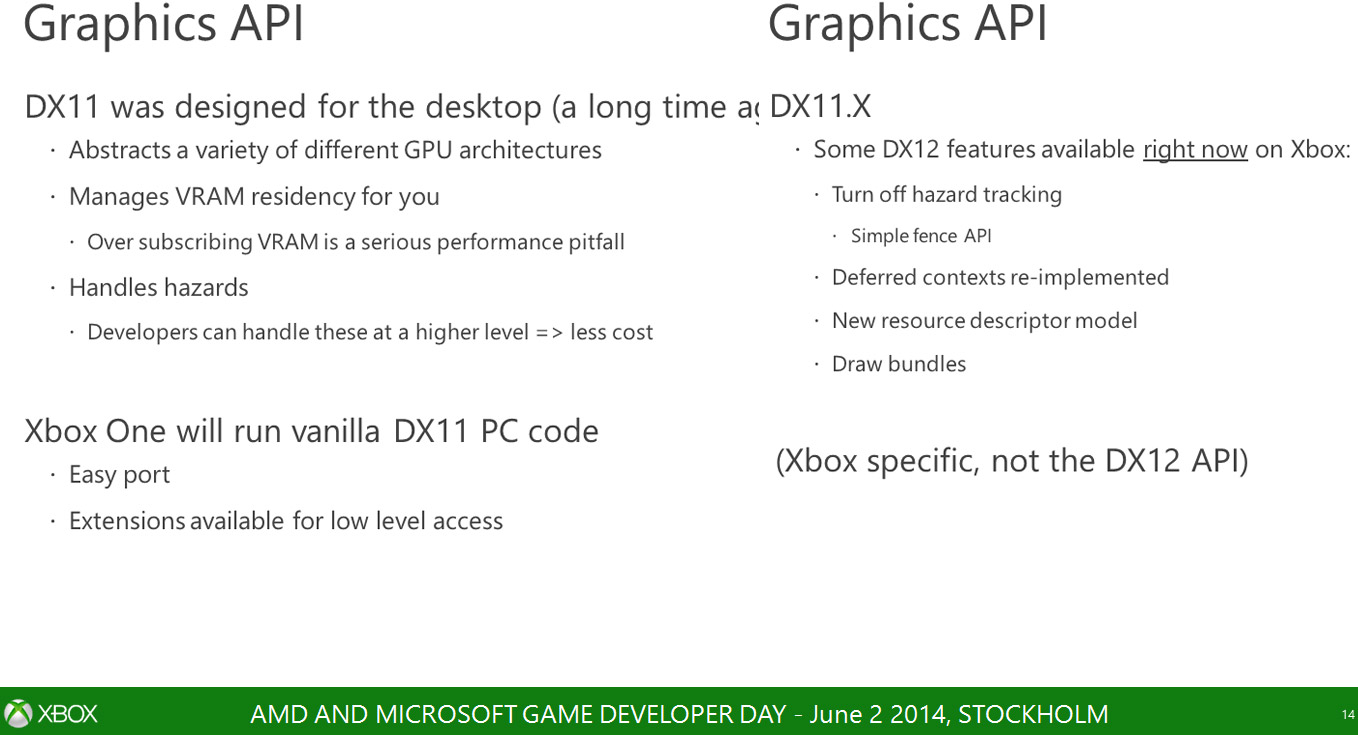
There are numerous crucial factors which come into play when discussing DirectX 12’s benefits on the Xbox One’s performance. We know from Microsoft there are already a few DIrectX 12 features availablefor the Xbox One. Phil Spencer has said DX12 for the Xbox One won’t be a massive change in performance. But there will likely be other tangible reasons for DirectX 12’s to be on the Xbox One,including easier game ports.
Now that we understand all of that – why is it the Xbox One benefits less from DirectX 12? While some might already be about to drone on about hardware issues such as eSRAM, less GPU performance than a high spec PC, the truth is actually a lot simpler. Lower level access is already available on the Xbox One’s API via an extension. DX12 features are in the Xbox One, but it’s not a full feature set by any means (although it’s debated if the Xbox One’s GPU can even support a full feature set) but let’s ignore that for a moment and focus on low level. The ‘full’ DX12 low level will likely bring a few performance improvements – but nothing like what’s available on PC.
inside-xbox-one-DX11-Graphics-API-martin-fuller-microsoft-dev-day
PC gamer’s have long suffered the issues of DX11 – and even during my review and preview of Mantleon the AMD’s R9 280, Thief went from 62 FPS on DX11 to over 80 with Mantle. Battlefield 4 was similar – 1080P on a mid range GPU suddenly became a non issue. My point being that it’s clear how much of an issue it is. The R9 280 on the test rig isn’t in the same ‘league’ as the I7. The I7 is traditionally paired with a much faster GPU (say an Nvidia GTX 780 or an AMD R9 290, yet even this super beefy CPU had issues. Think of it this way – the HD 4400 from Intel is an IGP (Integrated Graphics Processor) on the CPU. It’s slower than GPU’s like Nvidia’s GTX 730. And yet, DX12 makes the frame rate jump from 19FPS to 33 FPS.
I’ve said this before, and I’ll say it again. Some will swear that the Xbox One will receive no benefit for DX12 aside from PR and hype. Others believe it’s release will suddenly unlock an integrated on die GPU that will add another 5TFLOPS of performance to the machine (I’m being serious here… that’s the sad thing). The reality is somewhere in the middle – improved performance, but it won’t make the console ‘faster’ than the PS4. There’s too much of a gap in raw GPU performance between the two machines that software won’t solve… particularly when you consider the PS4’s API is pretty damn low level too.
But even IF there’s no performance increase (which I find unlikely) it’ll be likely easier to make games on the machine and make ports from PC a little simpler. That’s good news for indie developers in particular and even better news for both PC and Xbox One owners.

Thursday, 12 February 2015

Geforce GTX Titan Z Xtreme

GEFORCE GTX TITAN Z


GeForce GTX TITAN Z
ULTIMATE POWER. THE NEW GEFORCE® GTX™ TITAN Z.GeForce® GTX™ TITAN Z is a gaming monster, the fastest graphics card we’ve built to power the most extreme PC gaming rigs on the planet. Stacked with 5760 cores and 12 GB of memory, this dual GPU gives you the power to drive even the most insane multi-monitor displays and 4K hyper PC machines.
GTX TITAN Z GPU ENGINE SPECS:
CUDA Cores5760
Base Clock (MHz)705
Boost Clock (MHz)876
Texture Fill Rate (billion/sec)338
GTX TITAN Z MEMORY SPECS:
Memory Speed7.0 Gbps
Standard Memory Config12288 MB
Memory InterfaceGDDR5
Memory Interface Width768-bit (384-bit per GPU)
Memory Bandwidth (GB/sec)672
MORE INFORMATION